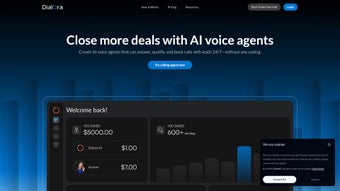

Download Dialora.ai – AI Voice Generation for Business Growth
Overview
Dialora.ai is a subscription‑based web application that brings cutting‑edge AI voice generation directly into the heart of business communication. Designed for companies of any size, Dialora.ai lets you create intelligent voice agents that can converse with customers 24 hours a day, seven days a week. By automating routine inquiries, appointment scheduling, order tracking, and even complex troubleshooting, the platform reduces the need for constant human oversight while preserving a natural, human‑like interaction experience.
The service is built on a robust cloud infrastructure, ensuring high availability, low latency, and secure data handling. With a user‑friendly dashboard, businesses can design, test, and deploy voice agents without needing deep technical expertise. Integration options include popular CRM tools, help‑desk platforms, and custom APIs, allowing you to embed AI‑driven voice capabilities wherever your customers are most active – be it on the phone, through IVR systems, or via web widgets.
In today’s fast‑paced market, delivering instant, accurate responses can be the difference between a satisfied customer and a lost sale. Dialora.ai empowers you to meet that demand, offering a scalable solution that grows with your organization and continuously learns from every interaction to improve future conversations.
Key Features & Business Benefits
- Natural‑Language Voice Synthesis: Generates lifelike speech in multiple accents and languages, making every call sound genuinely human.
- Smart Conversation Engine: Context‑aware AI that understands intent, follows multi‑turn dialogs, and can handle complex queries.
- 24/7 Availability: Voice agents stay online around the clock, ensuring customers never wait for a response.
- Seamless CRM & Help‑Desk Integration: Connects with Salesforce, HubSpot, Zendesk, and other platforms to pull real‑time data.
- Customizable Call Flows: Drag‑and‑drop builder lets you design personalized scripts without coding.
- Analytics Dashboard: Tracks call volume, sentiment, resolution rates, and provides actionable insights.
- Secure Data Handling: End‑to‑end encryption, GDPR compliance, and role‑based access controls protect sensitive information.
- Scalable Subscription Model: Tiered pricing that matches usage patterns, from startups to enterprise‑level deployments.
These features translate into tangible business advantages. First, operational costs drop dramatically because fewer agents are needed to manage repetitive calls. Second, response times shrink, boosting customer satisfaction scores and fostering brand loyalty.
Third, the analytics suite uncovers hidden trends—like peak call times or common pain points—allowing you to refine products and services proactively. Fourth, the multilingual capability opens doors to new markets without hiring additional staff. Finally, the platform’s continuous learning algorithms mean the voice agents improve over time, delivering higher accuracy and fewer handoffs to human agents.
In short, Dialora.ai is not just a tool; it’s a strategic asset that aligns AI technology with revenue‑driving outcomes.
Installation, Setup & Compatibility
Getting started with Dialora.ai is intentionally straightforward, catering to both tech‑savvy teams and business users who prefer a no‑code experience. The process begins by visiting the official website and selecting the appropriate subscription tier. After payment, you receive an email containing a secure activation link. Clicking the link opens the cloud‑based dashboard—no local installation is required, which means the software runs on any modern browser (Chrome, Edge, Firefox, Safari) and is instantly accessible from Windows, macOS, Linux, Android, or iOS devices. For organizations that prefer on‑premises deployment, Dialora.ai offers a Docker‑based container that can be hosted on private servers; this option is detailed in the “Enterprise Deployment Guide” available under the “Resources” tab.
Once logged in, the onboarding wizard walks you through three core steps: (1) creating your first voice agent by selecting a voice persona, language, and tone; (2) defining call flows using the visual flow editor, where you can drag intents, prompts, and decision nodes onto a canvas; and (3) linking external data sources via pre‑built connectors or custom REST APIs. Testing is performed in real time with a built‑in simulator that lets you speak or type queries and hear the agent’s response instantly. After validation, you publish the agent, and Dialora.ai generates a unique endpoint URL that can be integrated with your telephony provider (e.g., Twilio, Plivo) or embedded into web widgets using a simple JavaScript snippet.
Because Dialora.ai operates as a SaaS solution, it is compatible with all major operating systems—Windows 10/11, macOS 12 and later, Linux distributions, Android 9 and above, and iOS 13 and later. The platform also supports multi‑factor authentication (MFA) and single sign‑on (SSO) via SAML 2.0, ensuring secure access for enterprise teams. Ongoing updates are delivered automatically; there is no need to download patches or worry about version incompatibility. The service’s uptime SLA guarantees 99.9 % availability, and a dedicated support portal offers 24/7 assistance, knowledge‑base articles, and community forums to help you troubleshoot any issues quickly.
Pros, Cons, FAQ & Final Verdict
Pros
- Highly realistic voice output that enhances customer trust.
- Fully customizable call flows without programming knowledge.
- Robust integration ecosystem with leading CRM and telephony platforms.
- Scalable pricing model suitable for startups and large enterprises.
- Comprehensive analytics that drive continuous improvement.
Cons
- Subscription cost may be prohibitive for very small businesses.
- Advanced features (e.g., on‑premises deployment) are limited to higher‑tier plans.
- Learning curve for non‑technical users when designing complex multi‑turn dialogs.
Frequently Asked Questions
Can Dialora.ai handle multiple languages in a single call?
Yes. The platform supports over 20 languages and allows you to switch language contexts mid‑conversation based on user input, making it ideal for global customer bases.
Is there a free trial available?
Dialora.ai offers a 14‑day free trial with access to all core features, allowing you to evaluate performance before committing to a paid plan.
How does Dialora.ai ensure data privacy?
All data is encrypted in transit (TLS 1.3) and at rest (AES‑256). The platform complies with GDPR, CCPA, and ISO 27001 standards, and offers role‑based access controls for additional security.
Can I integrate Dialora.ai with my existing IVR system?
Absolutely. Dialora.ai provides RESTful APIs and pre‑built connectors for popular IVR solutions like Twilio Flex, Genesys, and Avaya, enabling smooth handoffs between traditional IVR menus and AI voice agents.
What support options are available after purchase?
All subscribers receive 24/7 email support, live chat for premium tiers, and access to an extensive knowledge base. Enterprise customers can also request a dedicated account manager.
Conclusion & Call to Action
Overall, Dialora.ai stands out as a powerful, secure, and flexible AI voice generation platform that directly addresses the pain points of modern customer service operations. Its natural‑language capabilities, combined with deep integration options and robust analytics, make it a compelling choice for businesses aiming to automate phone interactions without sacrificing quality. While the pricing may be a consideration for very small teams, the ROI realized through reduced staffing costs, higher satisfaction scores, and increased sales conversions quickly justifies the investment. If you’re ready to transform your call center into an intelligent, always‑on experience, sign up for the free trial today and start building voice agents that work for you around the clock.



.png)



